
Live on the Chrome Web Store
Trade and launchfrom the tab you’re on
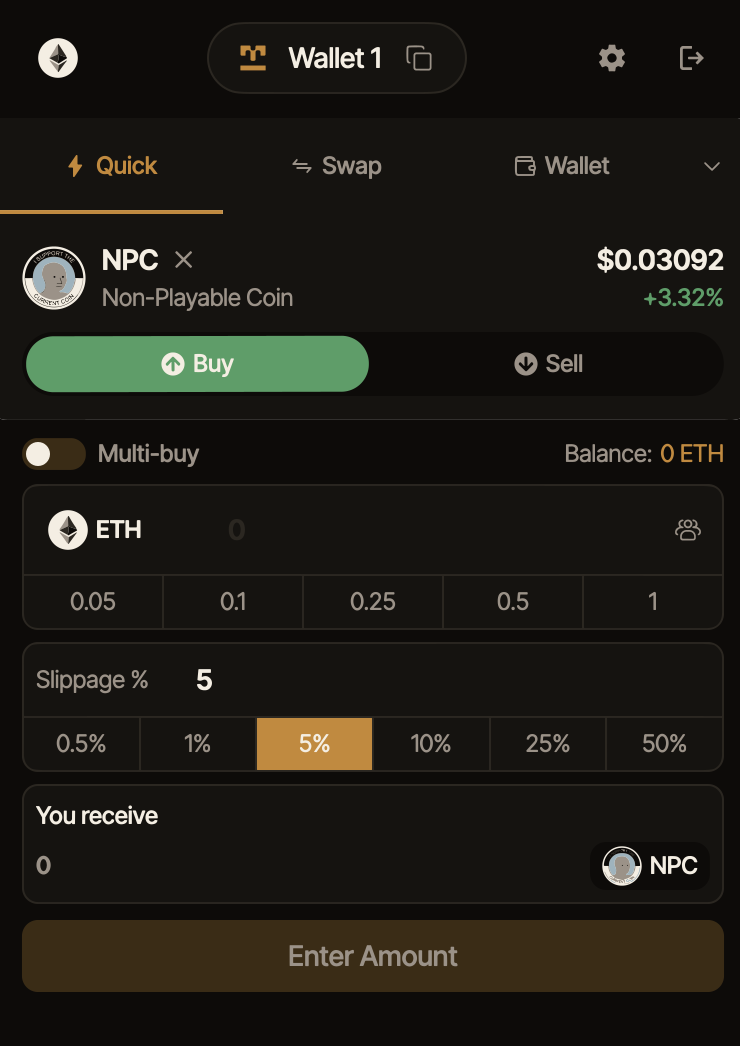
Noob Wallet turns the browser into a trading cockpit. Spot a token, buy it with a stack of wallets at once, or deploy one straight from a tweet — across nine chains, without ever leaving the page.
- 0
- Networks live
- 0
- Wallets in one bundle
- 0s
- Tweet to live token
- 0
- Keys we can see
What it does
MetaMask signs transactions. This is everything around the transaction.
It sees the token first
Open a chart, a launchpad or a tweet and the Quick Swap widget slides in already loaded with that contract. No copying an address, no pasting the wrong one.
Best-price routing by default
Every buy and sell is routed across the pools on that chain for the best fill. When a pool is thin you get an honest price-impact warning instead of a silent haircut.
Multi-buy that is actually parallel
Pick your wallets, set an amount per wallet, fire once. Every wallet broadcasts its own transaction at the same time — up to 100 of them — with live status each and retries only where they failed.
Turn a tweet into a token
A Deploy Token button sits on the post itself. Symbol, description and image come straight from it — you pick the chain and the launchpad, and it goes live.
Presales inside the widget
Land on a supported sale page and Quick Swap becomes a presale panel. Contribute, track your allocation and claim or refund on finalize, across many wallets at once.
PnL and rewards in place
Cost basis is tracked as you trade. Reflection dividends, creator tax and launch-pool fees are all claimable right under the token that earned them.
Launch
Deploy on the launchpad that fits, in under a minute.
Pick the chain and the launchpad, and the deploy runs in the same window you were already reading in. Each launchpad keeps its own rules — Noob Wallet just removes the tab-hopping around them.
Uniswap V3 and V4 pools and flap.sh are supported alongside the launchpads below, plus a direct deploy through Noob’s own deployer.
- Where you start
- From a tweet, from a launchpad page, or from the extension itself
- Chain
- You pick the network before anything is deployed
- Opening buy
- Fund the launch from your whole wallet stack in a single action
- Launchpad settings
- Whatever that launchpad supports is surfaced in the same flow
Launchpads supported
- Pump.fun
- Four.Meme
- OneMeme
- pill.fm
- Pons
- Noob




Atomic bundles
Snipe your own launch, before anyone else can.
- W1
- W2
- W3
- W4
- W5
- W6
5 of 6 landed · 1 sniped · three blocks
On BNB Chain, bonding-curve launches can go out as a block-builder bundle: the deploy and up to 47 wallets’ opening buys are submitted as one ordered unit. Everywhere else, multi-buy runs in parallel across as many as 100 wallets with per-wallet slippage protection.
- Atomic
- The deploy transaction and every wallet’s first buy land in one block, in order — or none of them land at all.
- Unsnipeable
- Nothing can slot in between the deploy and your buys, because the whole sequence is a single all-or-nothing unit.
- No partial fills
- The “two succeeded, one failed” problem disappears. A bundle either lands whole or misses whole.
- Signed on your machine
- Each wallet signs its own raw transaction in the browser. There is no contract in the middle holding anything.
Every wallet still signs for itself, in your browser, per session.
Security
The safest key is the one we never hold.
Your seed phrase stays on your machine. Signing happens locally, unlocked with your password, and the extension never asks you to paste a private key anywhere but the import screen. There is no account and no server that could move your funds.
- Key storage
- On-device only, never transmitted
- Encryption
- Encrypted locally, unlocked with your password
- Custody model
- Non-custodial — you hold the seed
- Signing
- Local, with ephemeral signers per wallet per session
- Trade protection
- Slippage limits, MEV protection, price-impact warnings
- Account
- None. No KYC, no sign-up, no premium tier
Networks
Nine chains live, one set of habits to learn.





Recognised surfaces
Land on any of these and the widget appears with the token already loaded — no address to copy, and no chance of pasting the wrong one.
- DexScreenerDexToolsGMGNUniswapRadarDEXPump.funFour.MemeOneMemepill.fmPonsflap.shX / Twitter
Get started
Three steps, then the widget comes to you.
Install from the Chrome Web Store
One click, no account, no KYC.
Create a wallet or import your seed
Stored locally and encrypted. It never leaves the device.
Open a chart, a launchpad or a tweet
The widget shows up on its own, already loaded.
Chrome extension
Available now
- Installs in one click
- Widget appears on charts, launchpads and tweets
- Full trading and deploy surface
Stop juggling five tabsto catch one launch.
Add Noob Wallet to Chrome and trade from wherever the chart already is.